Give your AI assistant full control of your Discord server.

Omnicord is a Model Context Protocol server that runs your Discord server through your own bot. Day-to-day chat, moderation, and administration, all the way up to building an entire community server from a one-paragraph brief. You describe what you want, your AI decides how, and Omnicord makes sure nothing destructive happens without your confirmation.

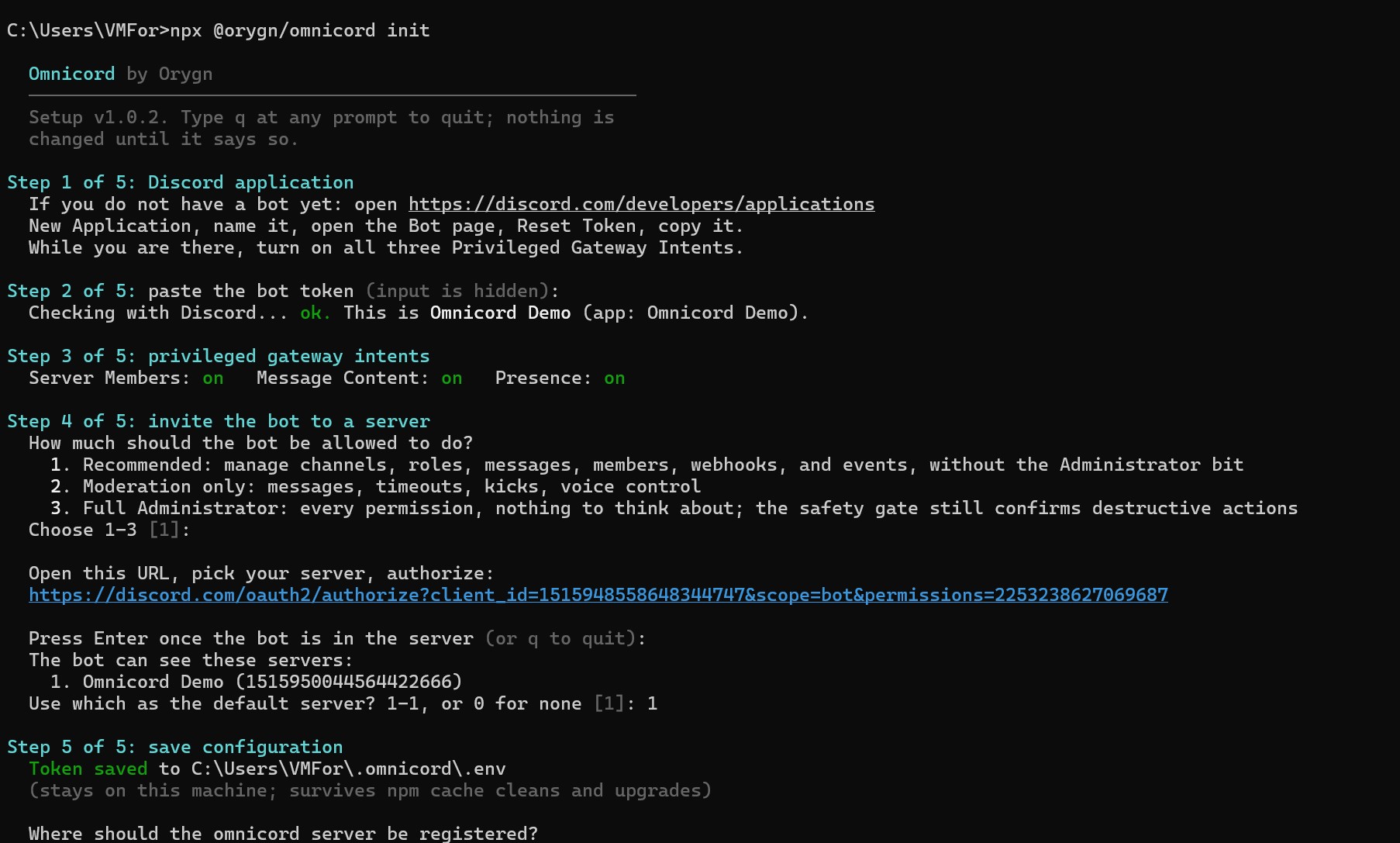
npx @orygn/omnicord init

Omnicord setup wizard validating a Discord bot live in the terminal

What it can do

140+ tools across the full Discord admin surface.

Omnicord turns the Discord REST API and gateway into a tool surface an AI client can drive directly. It enforces Discord's rules before they bite, queues politely behind rate limits, and returns results your AI can read and act on.

Build a server from a brief

Describe the community you want and Omnicord plans and executes the build: roles, categories, channels, and permissions in one additive operation. Save a layout as a blueprint, diff it against a live server, and rebuild it anywhere.

Messaging and reading

Send, edit, pin, react, run polls, schedule messages, post through webhooks, and DM members. Read channel history, search, members, roles, permissions, and the audit log so your AI can answer what happened and act on it.

Moderation and AutoMod

Timeouts, kicks, bans, prune, and bulk cleanup, each with a preview before anything runs. Configure Discord's server-side AutoMod, including its maintained slur and profanity preset lists, plus spam and mention-flood limits.

Community and structure

Events, stages, threads, forums, invites, welcome screen, and onboarding. Manage channels, categories, permission overwrites, reordering, and cloning. Add emojis, stickers, and soundboard sounds.

Real-time awareness

Subscribe to live server events and ask what is happening right now, or what you missed while you were away. Omnicord watches the gateway so your AI does not have to poll for changes.

Diagnostics

A setup check runs eight plain-English checks against your bot and tells you the exact fix for anything wrong. Bot info, rate-limit status, and permission explainers round it out.


The safety model

Nothing destructive happens without your confirmation.

Giving an AI control of a live server is only sensible if the dangerous actions are gated by something other than the model's judgment. In Omnicord, that gate is the server itself.

A confirmation gate on every destructive action

Deleting, banning, kicking, timeouts, and bulk actions never execute on the first call. The tool returns a human-readable preview and a single-use token bound to that exact action. The token expires after two minutes. Repeating the call with the token runs it. This is enforced by Omnicord, so a confused or compromised AI session cannot skip it.

Moderation that checks the rules first

Before any punitive action, Omnicord preflights Discord's role hierarchy, owner protection, and self protection. The bot cannot act above its station or against the owner or itself, and the failure mode is a clear explanation rather than a raw 403.

Local-first, no LLM, no cloud

There is no LLM inside Omnicord and no service behind it. The AI is your own client and the bot token stays in a local file. Nothing is uploaded anywhere and there is no Omnicord account. Omnicord controls a bot, not your user account, so it can never act as you or read your DMs.

A hardened transport for self-hosting

The HTTP transport uses bearer auth compared in constant time, rejects browser origins unless allowlisted, validates the Host header to close DNS rebinding, and refuses to start if bound beyond localhost without a token. The Docker image runs as a non-root user. A security self-audit mapped to the OWASP MCP Top 10 is published in the repository.

Install

One command from a bare Discord app to a working setup.

The setup wizard validates every step against Discord as you go, so you do not have to read a manual to get it right. You need a Discord account, a bot you create in the Developer Portal, and Node 20 or newer.

One-command setup

Run npx @orygn/omnicord init. The wizard takes the bot token with input hidden, verifies it live against Discord, checks the privileged intents and waits while you fix any that are off, generates an invite link at the permission level you pick, and writes the config into your AI client (backing up the file first). Claude Desktop, Claude Code, Cursor, and Windsurf are detected automatically.

From source

Clone the repository, run npm install and npm run build, then node dist/index.js init. The stdio transport is the default for desktop MCP clients that spawn a local process.

Docker

The image runs the HTTP transport as a non-root user with the container health check wired to the health endpoint. It binds beyond loopback, so it requires OMNICORD_HTTP_TOKEN and exits with a clear message without one. The token arrives through the environment at runtime and is never baked into the image.

Self-host over HTTP

Run the Streamable HTTP transport for remote-capable clients and self-hosting. This is also the path for ChatGPT, which supports remote MCP servers only, so it connects to Omnicord through a self-hosted HTTPS endpoint rather than the local flow.

Distribution

Published across npm, Docker Hub, the MCP Registry, Smithery, and Glama.

Omnicord is available everywhere people look for MCP servers. It scored an A grade across the board on Glama and is listed in the official MCP Registry.

npm @orygn/omnicord Docker orygn/omnicord Smithery listing MCP Registry listing Glama A grade PulseMCP listing Elastic License 2.0

Built with

TypeScript on Node.js, tested across three operating systems.

The server talks to Discord over REST and the gateway, queues behind rate limits, and reserves stdout for the MCP protocol. CI runs the build, unit logic, and both protocol smoke suites on Linux, Windows, and macOS across Node 20, 22, and 24.

TypeScript (strict) Node.js ≥20 MCP SDK discord.js REST + WS stdio + Streamable HTTP Zod Docker (alpine, non-root) CI on Linux, macOS, Windows

FAQ

Common questions about Omnicord.

Yes, by design. Every destructive action (delete, ban, kick, timeout, bulk cleanup) returns a preview and waits for your explicit confirmation before it runs. That gate is enforced by Omnicord itself, not by the AI model's judgment, so a confused or compromised session cannot skip it.
Not without you confirming each destructive step. The confirmation token is single use and expires after two minutes, and the AI cannot bypass it. You also choose the bot's permission level during setup, and the recommended option leaves out the full Administrator flag.
No. There is no LLM inside Omnicord and no cloud service behind it. The AI is your own client. The bot token and all data stay on your machine, and nothing is uploaded to Orygn. There is no Omnicord account.
It is free to use. Omnicord is source-available under the Elastic License 2.0, which means anyone can read, use, modify, and self-host it, including businesses running their own communities. The one thing the license forbids is reselling it as a hosted service.
You choose at setup. The recommended set covers managing channels, roles, messages, members, webhooks, and events without the Administrator bit. A moderation-only set and a full Administrator set are also offered. Permissions are per server and you can edit them later in Discord.
Claude Desktop, Claude Code, Cursor, and Windsurf are detected automatically by the setup wizard, and any other MCP client works with a config snippet. ChatGPT works only through the self-hosted remote HTTP transport, not the one-command local flow, because it supports remote MCP servers only.
No. Omnicord is a local tool, not a hosted always-on bot. The bot is online while your AI client is running. If you want it reachable continuously, you can self-host the HTTP transport.
No. Setup is one command followed by a guided wizard that validates each step against Discord as you go: it checks your bot token live, walks you through the privileged intents, generates an invite link, and writes the config into your AI client for you.

Built by Orygn

Omnicord is one of several tools Orygn has built around AI assistants and operational control.

Orygn builds custom software, security tooling, and infrastructure-level systems for teams that need them production-grade from day one. Omnicord came out of the same kind of work, applied to the job of letting an AI assistant run real systems safely.

Work with Orygn